Raylib: rotate a cube around its center via quaternions and rl.rlMultMatrixf

My first time working with raylib, 3D and quaternions. So maybe I am little bit lost and it is not an odin thing.

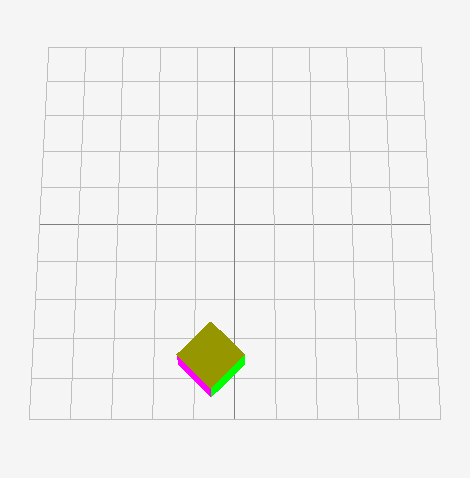
I want to rotate a cube by using its stored orientation (via rl.Quaternion) and apply an additional rotation on top of that. My problem: it rotates around the world’s origin not the cube’s. Here is my example code (you can press to reset the rotation):

package game

import "core:math"
import rl "vendor:raylib"

main :: proc() {

	rl.InitWindow(1600, 900, "Test rotation with quaternions")
	defer rl.CloseWindow()

	rl.SetTargetFPS(60)

	// Set up 3D camera
	camera := rl.Camera3D{}
	camera.position = rl.Vector3{10., 30.0, 0.}
	camera.target = rl.Vector3{0.0, 0.0, 0.0}
	camera.up = rl.Vector3{0.0, 1.0, 0.0}
	camera.fovy = f32(40)
	camera.projection = .PERSPECTIVE

	cube_position := rl.Vector3{4.5, 4.5, 0.5}
	cube_orientation := rl.Quaternion(1)

	for !rl.WindowShouldClose() {

		// HERE -> Rotate 45 degrees around the cube's Y-axis
		rotate_cube_by_this := rl.QuaternionFromEuler(0., math.to_radians_f32(45.), 0.)
		// except when space is held down, then reset the rotation to 0
		if rl.IsKeyDown(rl.KeyboardKey.SPACE){
			rotate_cube_by_this = rl.QuaternionFromEuler(0., 0., 0.)
		}

		rl.BeginDrawing()
		defer rl.EndDrawing()

		rl.ClearBackground(rl.RAYWHITE)

		rl.BeginMode3D(camera)
		defer rl.EndMode3D()

		rl.DrawGrid(10, 1.0)

		// Draw a simple cube with a rotation
		rl.rlPushMatrix()
			rl.rlTranslatef(cube_position.x, cube_position.y, cube_position.z)

			// HERE -> might be the problem?
			new_rotation := rl.QuaternionNormalize(rotate_cube_by_this * cube_orientation)
			rot_matrix := rl.QuaternionToMatrix(new_rotation)
			rl.rlMultMatrixf(&rot_matrix[0,0])

			// Draw each side of the cube with different colors
			size :f32= 1.0
			rl.rlBegin(rl.RL_QUADS)
				// Front face (1) - RED
				rl.rlColor4ub(255, 0, 0, 255)
				rl.rlNormal3f(0.0, 0.0, 1.0) // Normal pointing towards viewer
				rl.rlVertex3f(-size/2, -size/2, size/2) // Bottom-left
				rl.rlVertex3f(size/2, -size/2, size/2) // Bottom-right
				rl.rlVertex3f(size/2, size/2, size/2) // Top-right
				rl.rlVertex3f(-size/2, size/2, size/2) // Top-left

				// Back face (6) - GREEN
				rl.rlColor4ub(0, 255, 0, 255)
				rl.rlNormal3f(0.0, 0.0, -1.0) // Normal pointing away from viewer
				rl.rlVertex3f(size/2, -size/2, -size/2) // Bottom-right
				rl.rlVertex3f(-size/2, -size/2, -size/2) // Bottom-left
				rl.rlVertex3f(-size/2, size/2, -size/2) // Top-left
				rl.rlVertex3f(size/2, size/2, -size/2) // Top-right

				// Left face (2) - BLUE
				rl.rlColor4ub(0, 0, 255, 255)
				rl.rlNormal3f(-1.0, 0.0, 0.0) // Normal pointing left
				rl.rlVertex3f(-size/2, -size/2, -size/2) // Bottom-left
				rl.rlVertex3f(-size/2, -size/2, size/2) // Bottom-right
				rl.rlVertex3f(-size/2, size/2, size/2) // Top-right
				rl.rlVertex3f(-size/2, size/2, -size/2) // Top-left

				// Right face (5) - MAGENTA
				rl.rlColor4ub(255, 0, 255, 255)
				rl.rlNormal3f(1.0, 0.0, 0.0) // Normal pointing right
				rl.rlVertex3f(size/2, -size/2, size/2) // Bottom-left
				rl.rlVertex3f(size/2, -size/2, -size/2) // Bottom-right
				rl.rlVertex3f(size/2, size/2, -size/2) // Top-right
				rl.rlVertex3f(size/2, size/2, size/2) // Top-left

				// Top face (3) - GOLD
				rl.rlColor4ub(150, 150, 0, 255)
				rl.rlNormal3f(0.0, 1.0, 0.0) // Normal pointing up
				rl.rlVertex3f(-size/2, size/2, size/2) // Bottom-left
				rl.rlVertex3f(size/2, size/2, size/2) // Bottom-right
				rl.rlVertex3f(size/2, size/2, -size/2) // Top-right
				rl.rlVertex3f(-size/2, size/2, -size/2) // Top-lefts

				// Bottom face (4) - YELLOW
				rl.rlColor4ub(255, 255, 0, 255)
				rl.rlNormal3f(0.0, -1.0, 0.0) // Normal pointing down
				rl.rlVertex3f(-size/2, -size/2, -size/2) // Bottom-left
				rl.rlVertex3f(size/2, -size/2, -size/2) // Bottom-right
				rl.rlVertex3f(size/2, -size/2, size/2) // Top-right
				rl.rlVertex3f(-size/2, -size/2, size/2) // Top-left

			rl.rlEnd()

		rl.rlPopMatrix()
	}
}

Try setting camera target and position to center of cube, something along the lines of the following.

sudo code:

camera = {
	// adjust y to not start at floor level
	// adjust z to not start in middle of cube
	position   = { centroid.x, centroid.y + some_amount_above_floor, centroid.z + side_length/2 + some_amount_away_from_edge },
	target     = { centroid.x, centroid.y, centroid.z },
	up         = { 0.0, 1.0, 0.0},
	fovy       = 45.0,
	projection = .PERSPECTIVE,
}

You may have some apply to shifting to the y and z to get exactly the view you want. Also recommend setting up some mouse controls to manually rotate and zoom, so you can see your results. Sometimes the camera doesn’t start where you think it will, but you still may want to see how code changes look.

Here’s my basic camera move procedure. Call it before your begin draw in the main loop.

move_camera :: proc(camera: ^rl.Camera) {
	rl.CameraMoveToTarget(camera, rl.GetMouseWheelMove() * -4) //mouse wheel zoom
	if rl.IsMouseButtonDown(.LEFT) { //left mouse button rotate around target
		camera.up.y += rl.GetMousePosition().y
		rl.UpdateCamera(camera, .THIRD_PERSON)
	}
}

Thank you for your response!
My problem is If I had multiple cubes that should rotate (or spin) individually around their origins, your trick with the camera wouldn’t work any more? Or am I wrong?

I see, yes. The camera rotation is not for rotating the cube(s) themselves. The rotation for each cube should be about the centroid of each individual cube.

I’ll look some more at this a little later when I can.

1 Like

In this case, you would want to rotate your geometry prior to any translation. Currently you are translating, then rotating. This should allow the geometry to rotate around its local origin prior to you translating its position. The order of operations is important when determining how you want your geometry to behave.

So should I move the rlTranslatef(cube_position…) below the rotation code?

Yes. Apply the translation after you have performed the rotation.

Hmmm… unfortunately, it doesn’t change anything.
I thought that by applying my rlMultMatrix after the rlTranslatef, I technically do it before due to matrices magic? :sweat_smile:

I looked at this code for an example: raylib_multi_window_experimental/examples/others/rlgl_standalone.c at master · raylib-extras/raylib_multi_window_experimental · GitHub

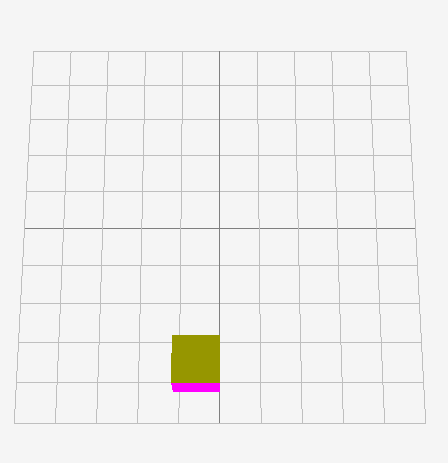
The example you provided was not in a compilable state for me. I’m not familiar with RayLib, so it took me a little while to figure out how to get your provided code into a runable example. Using the corrected base test case, I was able to produce the expected behavior of the cube being rotated around its local origin without any modifications to the logic.

package main

import "core:math"
import rl "vendor:raylib"
import rlgl "vendor:raylib/rlgl"

main :: proc() {

	rl.InitWindow(1600, 900, "Test rotation with quaternions")
	defer rl.CloseWindow()

	rl.SetTargetFPS(60)

	// Set up 3D camera
	camera := rl.Camera3D{}
	camera.position = rl.Vector3{10., 30.0, 0.}
	camera.target = rl.Vector3{0.0, 0.0, 0.0}
	camera.up = rl.Vector3{0.0, 1.0, 0.0}
	camera.fovy = f32(40)
	camera.projection = .PERSPECTIVE

	cube_position := rl.Vector3{4.5, 4.5, 0.5}
	cube_orientation := rl.Quaternion(1)

	for !rl.WindowShouldClose() {

		// HERE -> Rotate 45 degrees around the cube's Y-axis
		rotate_cube_by_this := rl.QuaternionFromEuler(0., math.to_radians_f32(45.), 0.)
		// except when space is held down, then reset the rotation to 0
		if rl.IsKeyDown(rl.KeyboardKey.SPACE){
			rotate_cube_by_this = rl.QuaternionFromEuler(0., 0., 0.)
		}

		rl.BeginDrawing()
		defer rl.EndDrawing()

		rl.ClearBackground(rl.RAYWHITE)

		rl.BeginMode3D(camera)
		defer rl.EndMode3D()

		rl.DrawGrid(10, 1.0)

		// Draw a simple cube with a rotation
		rlgl.PushMatrix()
			rlgl.Translatef(cube_position.x, cube_position.y, cube_position.z)

			// HERE -> might be the problem?
			new_rotation := rl.QuaternionNormalize(rotate_cube_by_this * cube_orientation)
			rot_matrix := rl.QuaternionToMatrix(new_rotation)
			rlgl.MultMatrixf(&rot_matrix[0,0])

			// Draw each side of the cube with different colors
			size :f32= 1.0
			rlgl.Begin(rlgl.QUADS)
				// Front face (1) - RED
				rlgl.Color4ub(255, 0, 0, 255)
				rlgl.Normal3f(0.0, 0.0, 1.0) // Normal pointing towards viewer
				rlgl.Vertex3f(-size/2, -size/2, size/2) // Bottom-left
				rlgl.Vertex3f(size/2, -size/2, size/2) // Bottom-right
				rlgl.Vertex3f(size/2, size/2, size/2) // Top-right
				rlgl.Vertex3f(-size/2, size/2, size/2) // Top-left

				// Back face (6) - GREEN
				rlgl.Color4ub(0, 255, 0, 255)
				rlgl.Normal3f(0.0, 0.0, -1.0) // Normal pointing away from viewer
				rlgl.Vertex3f(size/2, -size/2, -size/2) // Bottom-right
				rlgl.Vertex3f(-size/2, -size/2, -size/2) // Bottom-left
				rlgl.Vertex3f(-size/2, size/2, -size/2) // Top-left
				rlgl.Vertex3f(size/2, size/2, -size/2) // Top-right

				// Left face (2) - BLUE
				rlgl.Color4ub(0, 0, 255, 255)
				rlgl.Normal3f(-1.0, 0.0, 0.0) // Normal pointing left
				rlgl.Vertex3f(-size/2, -size/2, -size/2) // Bottom-left
				rlgl.Vertex3f(-size/2, -size/2, size/2) // Bottom-right
				rlgl.Vertex3f(-size/2, size/2, size/2) // Top-right
				rlgl.Vertex3f(-size/2, size/2, -size/2) // Top-left

				// Right face (5) - MAGENTA
				rlgl.Color4ub(255, 0, 255, 255)
				rlgl.Normal3f(1.0, 0.0, 0.0) // Normal pointing right
				rlgl.Vertex3f(size/2, -size/2, size/2) // Bottom-left
				rlgl.Vertex3f(size/2, -size/2, -size/2) // Bottom-right
				rlgl.Vertex3f(size/2, size/2, -size/2) // Top-right
				rlgl.Vertex3f(size/2, size/2, size/2) // Top-left

				// Top face (3) - GOLD
				rlgl.Color4ub(150, 150, 0, 255)
				rlgl.Normal3f(0.0, 1.0, 0.0) // Normal pointing up
				rlgl.Vertex3f(-size/2, size/2, size/2) // Bottom-left
				rlgl.Vertex3f(size/2, size/2, size/2) // Bottom-right
				rlgl.Vertex3f(size/2, size/2, -size/2) // Top-right
				rlgl.Vertex3f(-size/2, size/2, -size/2) // Top-lefts

				// Bottom face (4) - YELLOW
				rlgl.Color4ub(255, 255, 0, 255)
				rlgl.Normal3f(0.0, -1.0, 0.0) // Normal pointing down
				rlgl.Vertex3f(-size/2, -size/2, -size/2) // Bottom-left
				rlgl.Vertex3f(size/2, -size/2, -size/2) // Bottom-right
				rlgl.Vertex3f(size/2, -size/2, size/2) // Top-right
				rlgl.Vertex3f(-size/2, -size/2, size/2) // Top-left

			rlgl.End()

		rlgl.PopMatrix()
	}
}


As shown in the images, the cube is rotating around its local axis. The rotation is always 45 degrees, but the geometry is rotated.

2 Likes

Thank you so much for your effort! <3

I was wondering why my example didn’t work for you - and surprise! I used an old odin version from 2024! :smiley:

Sorry, I should have checked this way earlier. I upgraded my odin and now it works with your code. Maybe there was a bug in the older version.

Again, thank you very much!

Here’s an updated move_camera procedure for anyone who may want it. Can move and rotate in all directions. Helpful for debugging and seeing where things ended up.

  • W - forward
  • A - Left
  • S - back
  • D - right
  • E - down
  • Q - up
  • R - reset to origin
  • LMB Down and drag - rotate
  • MouseWheel - zoom in/out

When initializing the camera, make a copy of it to camera_origin for resetting. Then pass both to move_camera each loop before draw.

camera_origin := camera
move_camera :: proc(camera: ^rl.Camera, camera_origin: rl.Camera) {
	rl.CameraMoveToTarget(camera, rl.GetMouseWheelMove() * -4) //mouse wheel zoom
	if rl.IsMouseButtonDown(.LEFT) { //left mouse button rotate around target
		rl.UpdateCamera(camera, .THIRD_PERSON)
	}

	for key := rl.GetKeyPressed(); key > .KEY_NULL; key = rl.GetKeyPressed() {
		#partial switch key {
		case .W: rl.CameraMoveForward(camera, 1.0, true)  // camera forward
		case .A: rl.CameraMoveRight(camera, -1.0, true)   // camera left
		case .S: rl.CameraMoveForward(camera, -1.0, true) // camera back
		case .D: rl.CameraMoveRight(camera, 1.0, true)    // camera right
		case .E: rl.CameraMoveUp(camera, -1.0)            // camera down
		case .Q: rl.CameraMoveUp(camera, 1.0)             // camera up
		case .R:
			camera^ = camera_origin                         // camera reset
			rl.UpdateCamera(camera, .THIRD_PERSON)
		}
	}
}
move_camera(&camera, camera_origin)