I am sure this code can be arranged better but it’s just something to show the effects of various Raylib blend modes.
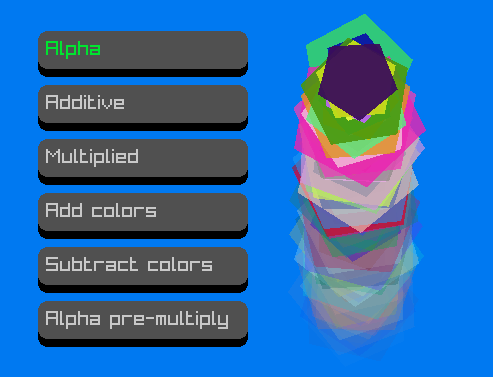
// https://github.com/odin-lang/Odin/tree/master/vendor/raylib

package ray_blendmodes

import rl "vendor:raylib"

WIN_W :: 800
WIN_H :: 450
NUM_BUTTONS :: 6        // 6 GUI buttons
GUI_W :: 210            // GUI buttons width
GUI_H :: 38             // GUI buttons height
MAX_PARTICLES :: 400
GRAVITY :f32: 3.0

Particle :: struct{pos:rl.Vector2,col:rl.Color,size:f32,rot:f32,active:bool}
tail:=[MAX_PARTICLES]Particle{}

Button :: struct{pos:rl.Vector2,txt:cstring}
buttons:=[NUM_BUTTONS]Button{}
hover:Button
clicked:Button
selected_button_idx:int

// ####################################
main :: proc(){
    using rl
    InitWindow(WIN_W,WIN_H,"Raylib blend modes")
    SetTargetFPS(60)
    InitParticles()
    InitButtons()
    // - MAIN
    for !WindowShouldClose(){
        // update
        UpdateParticles()
        CheckMouseToButtonsInteraction()
        // draw
        BeginDrawing()
            ClearBackground(BLUE)
            DrawParticles(BlendMode(selected_button_idx))
            DrawButtons()
        EndDrawing()
    }
    // Done
    CloseWindow()
}
// ####################################

GetRandomColor :: proc() -> rl.Color{
    return rl.Color{
        u8(rl.GetRandomValue(0,255)),
        u8(rl.GetRandomValue(0,255)),
        u8(rl.GetRandomValue(0,255)),
        u8(255)
    }
}

InitButtons :: proc(){
    ypos:=f32(50)
    labels:=[6]cstring{"Alpha","Additive","Multiplied","Add colors","Subtract colors","Alpha pre-multiply"}
    for i in 0..<NUM_BUTTONS{
        buttons[i]=Button{{30,ypos},labels[i]}
        ypos+=GUI_H+16
    }
    clicked=buttons[0]  // select the first button as 'clicked'
    selected_button_idx=0
}

CheckMouseToButtonsInteraction :: proc(){
    hover=Button{}
    for i in 0..<NUM_BUTTONS{
        checkrec:=rl.Rectangle{buttons[i].pos.x,buttons[i].pos.y+8,GUI_W,GUI_H}
        if rl.CheckCollisionPointRec(rl.GetMousePosition(),checkrec){
            hover=buttons[i]
            if rl.IsMouseButtonPressed(.LEFT){
                clicked=hover
                selected_button_idx=i
            }
        }
    }
}

DrawButtons :: proc(){
    using rl
    for i in 0..<NUM_BUTTONS{
        bt:=buttons[i]
        DrawRectangleRounded({bt.pos.x,bt.pos.y+8,GUI_W,GUI_H},0.5,4,BLACK)
        DrawRectangleRounded({bt.pos.x,bt.pos.y,GUI_W,GUI_H},0.5,4,hover==bt ? GRAY : DARKGRAY)
        DrawText(bt.txt,i32(bt.pos.x+8),i32(bt.pos.y+8), 20, clicked==bt ? GREEN : LIGHTGRAY)
    }
}

InitParticles :: proc(){
    for i in 0..<MAX_PARTICLES{
        tail[i].col=GetRandomColor()
        tail[i].size=f32(rl.GetRandomValue(20,50))
        tail[i].rot=f32(rl.GetRandomValue(1,360))
        tail[i].active=false
    }
}

UpdateParticles :: proc(){
    // update - activate 1 particle per frame
    for i in 0..<MAX_PARTICLES{
        if !tail[i].active{
            tail[i].active=true
            tail[i].pos=rl.GetMousePosition()
            tail[i].col[3]=255
            break
        }
    }
    // update - move/rotate/fade particles
    for i in 0..<MAX_PARTICLES{
        if tail[i].active{
            tail[i].col[3]-=3
            if tail[i].col[3]<=0{
                tail[i].active=false
                continue
            }
            tail[i].pos.y+=GRAVITY
            tail[i].rot+=1.5
        }
    }
}

DrawParticles :: proc(blendmode:rl.BlendMode){
    rl.BeginBlendMode(blendmode)
        for i in 0..<MAX_PARTICLES{
            if tail[i].active{
                rl.DrawPoly(tail[i].pos,5,tail[i].size,tail[i].rot,tail[i].col)
            }
        }
    rl.EndBlendMode()
}